


llmhoarder - Hoard Ollama Models on your NAS Respository
llmhoarder - Hoard Ollama Models on your NAS Respository
Thursday, 13 August 2026, 06:20 PM# tech ai
If you try out and test a lot of Ollama models, either your expensive SSD 💾 fills up quickly, or you keep downloading the same models over and over while waiting around. This is particularly painful on metered connections. It gets even worse in a corporate setup 🏢, where multiple people may download the same model independently, adding redundant traffic to the shared internet connection.
The Solution
Enter llmhoarder. Instead of doing ollama pull model just do llmhoarder pull model. If a requested model is available in the repository, llmhoarder retrieves it from there. Otherwise, it downloads the model from the Ollama library and stores it in the repository. Now you can remove the model from Ollama and pull it again as many times as you want without using the internet again.
Github here ➡️ shibenb/llmhoarder
There is no added complexity or setup required in your normal Ollama workflow. So you can use llmhoarder pull model and ollama pull model interchangeably, it won't affect your Ollama setup.
How to use
Make sure Ollama is already running. Now, if you run it the first time, it asks you your local network repository path.
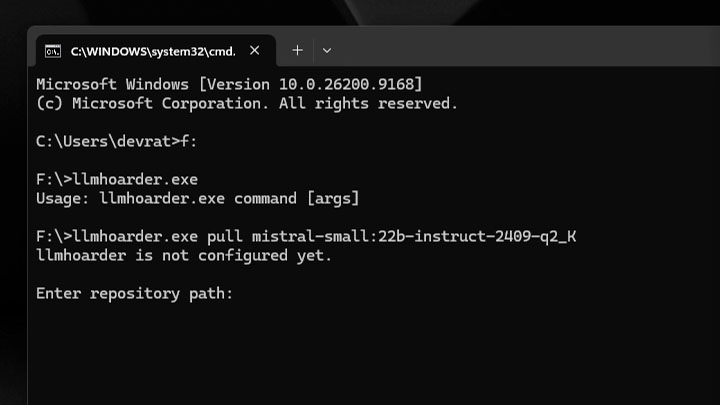
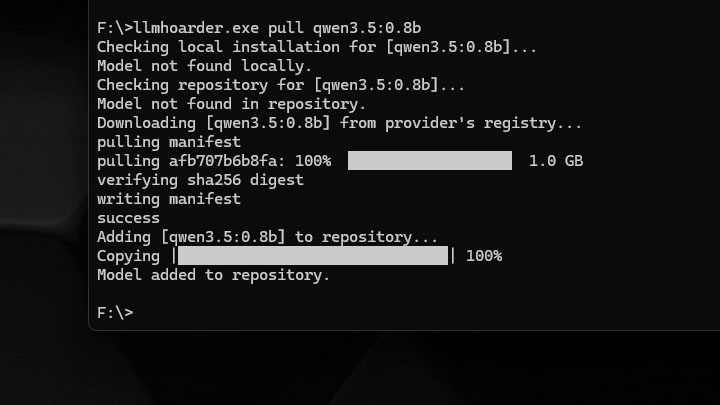
Just look up the model name from Ollama's library and do a pull. It downloads to Ollama as usual, and then it uploads it to the repository.
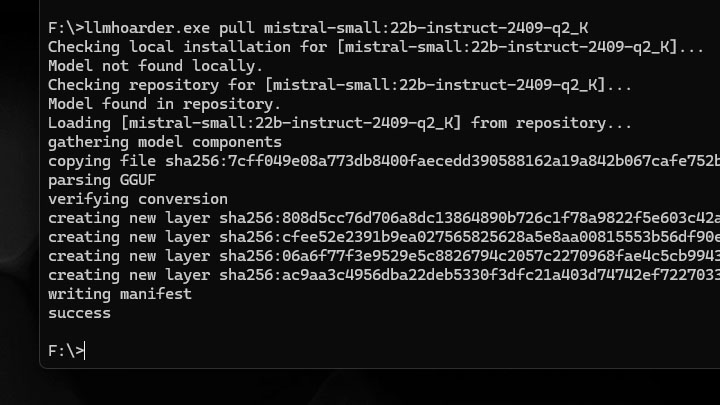
On a different computer, if you do a pull, now it fetches it from the repository.
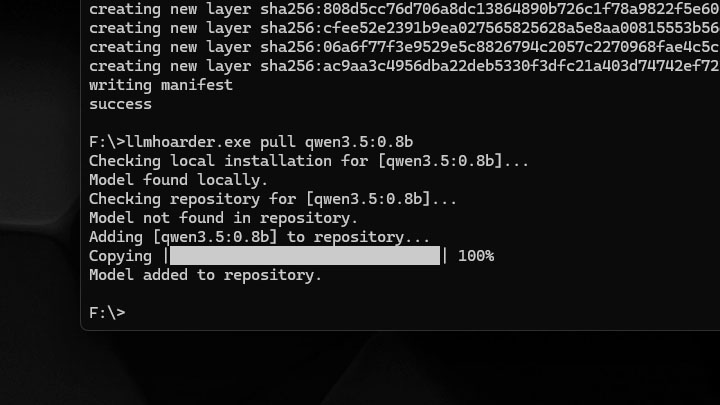
Lets say you accidenly do a pull of a model which Ollama already has it. llmhoarder uses it as an opportunity to hoard it if it doesn't have it.
If multiple people ask for the same model, llmhoarder is careful not to mess things up, dont worry.
How it works
llmhoarder is as conservative as possible towards your Ollama installation. It follows a simple philosophy of not comng in the way of your Ollama installation and creates no additional rules of its own.
IsModelInstalled?
│
├── no → RepositoryState?
│        │
│        ├── ABSENT → Initialize → PullFromRegistry → PushToRepository → Clean
│        ├── DIRTY  → PullFromRegistry
│        └── CLEAN  → PullFromRepository
│
└── yes → RepositoryState?
         │
         ├── ABSENT → Initialize → PushToRepository → Clean
         ├── DIRTY  → do nothing
         └── CLEAN  → do nothing
And that's it!
llmhoarder is currently a small personal project under active development. The choice of Go is to make the program cross-platform. The build mechanism ensures no third-party Go dependencies. 💻
The current focus is Ollama, but the architecture is intentionally designed to support other model providers in the future, such as LM Studio. Here's the devlog video related to this article.
Hope you enjoyed this post. Follow me on X to find out more, thanks.